
1
We all use Google dozens of times a day to settle random arguments, look up recipes, or figure out what that weird symptom means. But most of us are only tapping into about 5% of what this massive engine can actually do.
Underneath that simple search box lies a hidden universe of secret search tricks, buried privacy settings, and power-user tools that Google doesn’t exactly go out of its way to advertise.
I put together 30 of the most game-changing Google secrets, shortcuts, and privacy toggles that will turn you into an absolute power user.
1. The “Un-Google Yourself” Trick (&pws=0)
Google customizes your search results based on everything you’ve clicked in the past. To strip away this “filter bubble” and see raw, un-biased results, just add &pws=0 to the very end of your search web address. It resets the engine’s biases without making you log out.
2. Skip Web Fluff and Get Raw Files (filetype:)
Stop wasting time reading 10-paragraph blog intros when you just need a real document. Type your search topic followed by filetype:pdf or filetype:xlsx. Google will ignore normal web pages and give you direct downloads to whitepapers, spreadsheets, and public files.
3. Listen to What Google Keeps of Your Voice
If you’ve ever used Google Assistant or voice search, there’s a good chance Google saved audio clips of you speaking. Scary? A bit. But you can actually go listen to them, delete them, and turn the feature off under your account’s Web & App Activity settings.
4. Peek at the Creepily Accurate “Ad Profile” Built on You
Want to see who Google thinks you are? Head to adssettings.google.com. You’ll see your estimated age bracket, marital status, income group, and a giant list of hyper-specific interests. The best part? You can toggle off any categories you find a little too invasive.
5. The Map That Tracks Your Every Move
If Location History is turned on, Google Maps builds a detailed diary of everywhere you go. Open Google Maps Timeline on your phone or computer to see an interactive map showing every street, store, and city you’ve visited in the past few years—complete with auto-delete options!
6. Search for Hidden Folders (Google Dorking)
Ethical hackers use a trick called “Google Dorking” to find exposed stuff on the web. Searching site:website.com intitle:"index of" can reveal open file directories, dev servers, and unlinked folders that site owners totally forgot to lock down.
7. Google Photos Can Read Text Inside Images
You don’t need to manually label your photos to find them. Uploaded a pic of a receipt three years ago? Type the name of the store into Google Photos. Thanks to built-in text recognition (OCR), Google reads the actual physical words inside your photos to bring them up instantly.
8. Download Your Entire Lifetime Footprint (Google Takeout)
If you ever want to leave Google behind—or just want a hard offline backup of your life—go to takeout.google.com. It packages everything you’ve ever done (Gmail archives, raw photo files, browser bookmarks, and YouTube comments) into a single downloadable zip file.
9. Turn On Speed Trap Warnings in Maps
Google Maps hides some of its best driving features in the settings menu. Deep inside the navigation settings, you can toggle on live speedometers, off-route alerts, and real-time speed camera warnings so you never get caught off guard by a surprise ticket.
10. Stop Android Apps from Talking Behind Your Back
On Android devices, Google tracks how often you open and use non-Google apps like TikTok or mobile games. This feeds right into your ad profile, but you can pull the plug on cross-app activity tracking in your account’s Data & Privacy tab.
11. Read Hidden Metadata with Reverse Image Search
When you drop a picture into Google Lens, it doesn’t just scan visual patterns. It also inspects the file’s hidden EXIF metadata, which can reveal the exact camera model, lens settings, and sometimes even the precise GPS coordinates of where the shot was taken.
12. Spy on Your Own Open Tabs Across Devices
Left an important article open on your computer but had to head out? Open Chrome on your phone, hit the menu, tap History, and select Tabs from other devices. As long as you’re logged in, you can see every active browser tab running across all your devices in real-time.
13. Stop Buying Overpriced Stuff with Range Tricks
Bypass sponsored listings and overpriced retail blogs by using numerical range operators. Searching leather jacket $50..$120 forces Google to only display products strictly within your budget while completely ignoring items outside your price range.
14. Your Phone Tracks You Even When GPS Is Dead
Think turning off GPS hides your location? Not quite. Google uses nearby Wi-Fi network names (BSSIDs) and local cell towers to estimate your position within a few feet. It’s why location-aware apps still work indoor when satellite positioning is completely powered off.
15. Skip Travel Agent Fees with Google Flights
Stop using sketchy third-party booking portals with surprise markups. Go straight to [google.com/travel/flights](https://google.com/travel/flights). It plugs directly into raw airline data feeds, giving you price-prediction graphs that tell you if current fares are high or low, along with instant price-drop alerts.
16. Plan Your Digital Afterlife
Google actually lets you set up a digital estate plan using the Inactive Account Manager([myaccount.google.com/inactive](https://myaccount.google.com/inactive)). You can set a timer (like 3 months of total inactivity), after which Google will notify a trusted loved one, hand over designated files, or wipe your profile completely.
17. Mine Raw Scientific Data Instead of Blog Fluff
When you need real numbers instead of opinions, normal search can be frustrating. Try Google Dataset Search (datasetsearch.research.google.com) instead. It’s a dedicated engine designed specifically to pull up raw CSVs, research spreadsheets, and official government stats.
18. Unlock Chrome’s Secret Control Room
Type chrome://net-internals or chrome://system directly into your browser bar. Instead of a normal web page, you’ll open Chrome’s internal diagnostic suite, where you can clear stuck DNS caches, inspect active network sockets, and view detailed system hardware stats.
19. Chart How Language Has Changed Since 1500
Google digitized millions of printed books published over the last 500 years for the Google Books Ngram Viewer([books.google.com/ngrams](https://books.google.com/ngrams)). Type in any word or slang term, and it’ll plot a real-time timeline showing how frequently that phrase appeared in literature over the centuries.
20. Revoke Old App Permissions You Forgot About
Over the years, you’ve probably clicked “Sign in with Google” on dozens of random sites and quizzes. Many of those apps still have access to your profile! Head to your security settings and check Third-party apps with account access to revoke tokens with a single click.
21. Test Secret Beta Features (Google Labs)
Want to try next-gen search features before everyone else? Visit labs.google.com. This is Google’s experimental playground where you can opt into early-stage beta tests for AI search features, custom coding assistants, and experimental workspace tools.
22. Turn Your Browser Retro
Need a fun retro break? Search Google in 1998 or visit community mirrors like Google Terminal. Google will completely re-skin your search bar into a green-on-black command-line terminal or recreate its original, clunky homepage from the year it first launched.
23. Bypass Blocked Sites with Google Translate
If a local web page or news article is blocked on your public network, paste the link into Google Translate, select any target language, and click the generated link. Google’s cloud servers will fetch the page internally and bypass local network blocks effortlessly.
24. Play Secret Ad-Free Video Games
Google hides classic video games right inside the search bar. Just type Pac-Man, Play Snake, Solitaire, or Minesweeper into the search box to launch clean, completely ad-free versions of these classics directly in your browser.
25. Free Instruments for Musicians
Don’t download clunky tuning apps full of pop-up ads. Searching Google Tuner opens a clean chromatic tuner that uses your device microphone to tune guitars or violins. Need to practice timing? Search Metronome for an ad-free tempo clicker right in your tab.
26. Force Your Browser to Spin (do a barrel roll)
Want a quick party trick to throw off a friend? Search do a barrel roll. The entire search results page will execute a smooth 360-degree spin in your browser window. Searching askew will tilt the page interface slightly off-axis, too!
27. Stop Your Data from Training AI
If you use Gemini or Google Workspace AI tools, your prompts are saved to help train systems. You can review your history, delete prompt logs, or pause training retention completely by visiting the Gemini Apps Activity tab in your account dashboard.
28. Search Inside Any Website from the Address Bar
You don’t need to load a website first just to search its contents. In Chrome, type the domain name (like reddit.com or youtube.com) into your address bar and hit Tab. Your URL bar transforms into a direct internal search box for that specific site.
29. Built-in Utility Widgets
Skip heavy utility sites for simple tasks by using built-in search widgets:
Color Picker— Instant design tool for HEX and RGB codes.Breathing Exercise— Guided 1-minute mindfulness relaxation visual.Flip a Coin/Roll a Die— Instant, unbiased decision-makers.
30. Track Flights Live in Real-Time
Skip clunky tracking websites when picking someone up from the airport. Type any active flight number (like UA2410 or BA117) directly into the standard search box to get an interactive card showing the plane’s live location, speed, altitude, terminal, and gate info.


15 Reddit Scandals That Changed the Internet Forever
Reddit is one of the web’s biggest experiments in community design: pseudonymous users, volunteer moderators, voting systems, recommendations, and a company trying to build a business around all of it….

Web Design Schools Have a Giant YouTube University Problem — And AI Just Made It Worse
If you wanted to become a web designer 15 years ago, going to school made sense. You needed someone to teach you HTML, CSS, Photoshop, typography, UX and all the…

This Website Found More Than 5 Million Forgotten iPhone Videos… and It’s Weirdly Emotional
An old iPhone feature accidentally created a massive archive of random lives, bad camera work, dogs, vacations, and very normal afternoons. Now you can watch it one clip at a…

The Death of Apps Has Already Begun
We spent the last 15 years installing apps for everything. An app for email. An app for music. An app for banking. An app for editing photos. An app for…
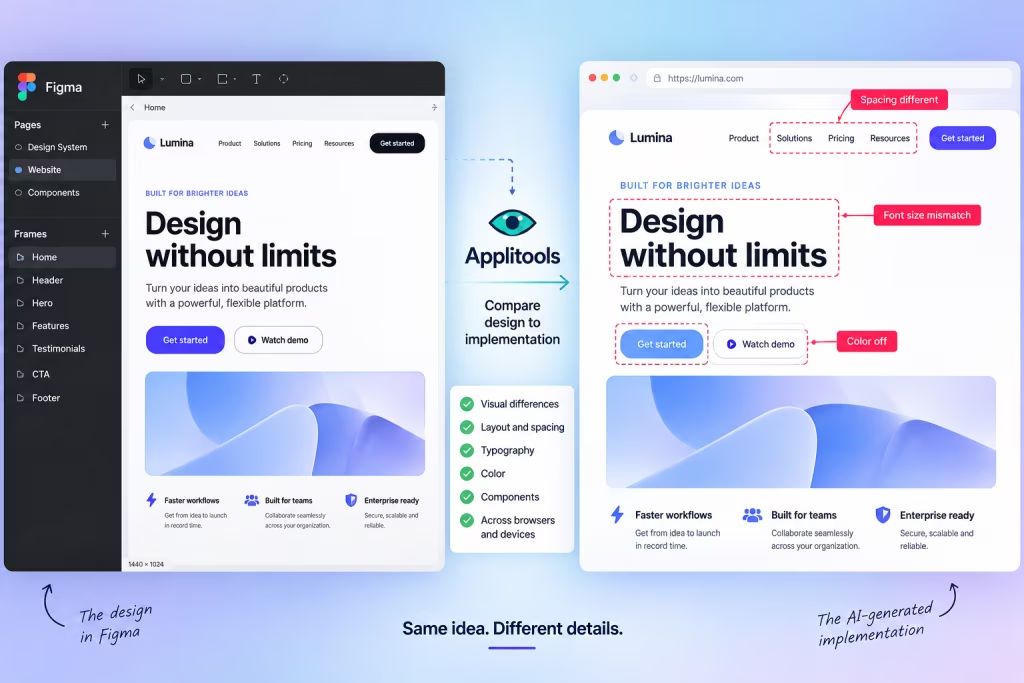
AI Can Build Your UI. Now Figma Can Tell It When It Screwed Up.
AI coding tools have become remarkably good at turning prompts into working interfaces. The awkward part comes afterward: does the thing they built actually look like the design? A new…

Cloudflare Just Gave AI Training Bots the Middle Finger
If you run a website, you probably want Google to crawl it. You probably don’t want every AI company on the planet helping itself to your content to train its models. Until…