1
Let’s be honest: most designers who put something on Gumroad don’t make enough to buy a fancy coffee, let alone pay rent.
It’s not because they’re bad designers — it’s because they treat Gumroad like a file storage service instead of a business.
If you’re ready to turn Gumroad into an actual income stream, here’s the game plan I wish someone had handed me before I ever hit “Publish.”
Start With Your Business Model — Don’t Wing It
Think of Gumroad like setting up a design agency, but instead of clients, you’re selling pre-made solutions. Are you going for volume or specialization? That choice will change everything.
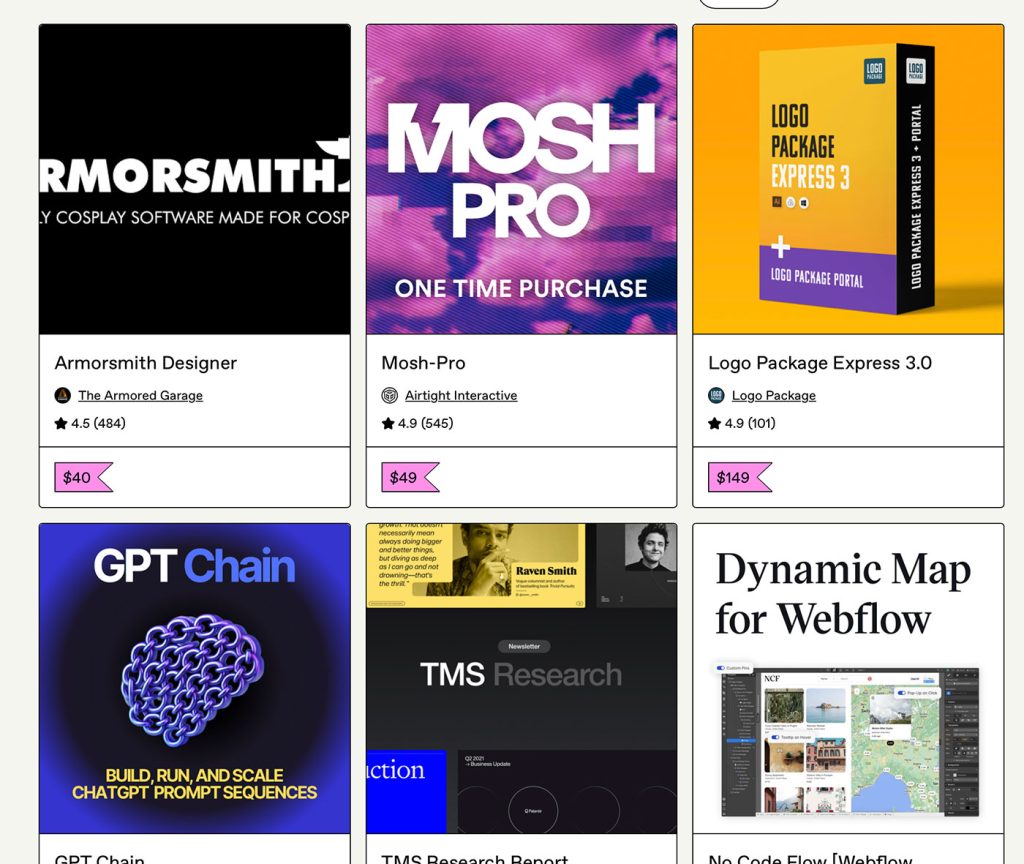
Some people crush it selling $15 Instagram template packs. It works because they’re quick to buy and appeal to a broad audience. On the other end, you’ve got folks like Untitled UI selling $149 design systems for Figma — way fewer customers, but each sale moves the needle.
And then there’s the subscription crew who charge monthly for a steady stream of fresh illustrations.
Here’s the trick: you don’t have to marry one model forever. Start small to build an audience, then layer on higher-ticket or recurring offers when you have trust.
Pick Products People Already Want
The biggest mistake? Making something cool that nobody’s looking for. You want to jump into streams that are already flowing.
UI kits, social media templates, custom fonts, illustration packs, Webflow templates, pitch decks, device mockups — these have proven demand. Search Gumroad or Creative Market and you’ll see bestsellers with hundreds or thousands of purchases.
That’s your starting point. Look at what’s already popular, then ask: what’s missing here? Maybe everyone’s doing mobile UI kits in light mode, but nobody’s nailed a premium dark mode version. Maybe the presentation templates all scream “corporate,” but there’s nothing for creatives pitching lifestyle brands.
Your Gumroad Page Is a Sales Page, Not a File Dump
If your listing says “UI Kit – 100 screens” and shows one sad screenshot, you’ve already lost. The Gumroad page is your one shot to make people believe your product is worth their money.
Think like Apple. Lead with a benefit:
- Not “Figma UI Kit.”
- But “Launch Your SaaS Dashboard 2x Faster — Figma-Ready.”
Use big, polished mockups. Show it in context — your dashboard on a laptop screen, your icon set inside a mobile app, your font on a poster. Spell out exactly who it’s for and how it makes their life easier. And if you’ve got proof people love it, flaunt it — tweets, reviews, number of teams using it.
Basically create a mini-landing page with storytelling, visuals, and benefits layered in. That’s the level you’re aiming for.
Sell More by Packaging Smart
A single $29 product is fine. But bundles and upsells are where your income starts compounding.
Got a UI kit and a matching icon pack? Bundle them for $39 instead of $48. Create a “premium” version of your font that comes with alternates, ligatures, and a commercial license. Add a “pay what you want” tier so superfans can drop $50 instead of $15.
And here’s a sneaky one: include a link inside your product files to related products. Someone who just bought your mockup pack might be interested in your matching textures.
Launch Like You Mean It
The biggest rookie mistake? Uploading a product, tweeting once, and calling it done. A good launch starts before you’ve finished the product.
Two weeks out, post a sneak peek on X or Dribbble. A week before, share a quick video showing it in action. On launch day, email your list, hit Product Hunt, post in relevant design groups, and tell your friends to share. Then, when the first buyers post feedback, screenshot it and share it again.
And maybe even pair it with a “24 hours only” launch price that creates urgency. That’s how you get momentum.
Keep Sales Alive With Content
Social posts fade. Good content keeps selling for you while you sleep.
Write a tutorial showing how to design a SaaS dashboard — and use your UI kit in the examples. Record a YouTube walkthrough on creating a pitch deck — with your template front and center. Offer a free 10-icon pack, but link to the full 300-icon set at the end.
Use the Tools Gumroad Gives You
Gumroad’s not just a checkout page. Flash sales? Discount codes. Want others to sell for you? Affiliate program. Have a loyal audience? Let them pay more with “pay what you want.” Want to drip out content? Set timed releases for a subscription.
Many users use the “pay what you want” model to make freebies go viral — and still gets big tips from fans.
Treat Buyers Like Teammates, Not Transactions
Every sale is a new relationship. Say thank you. Send them a surprise bonus. Ask how they used your product and feature them on your socials. Offer a loyalty discount when you launch your next thing.
Think Years, Not Days
Gumroad success isn’t about hitting it big with one product — it’s about stacking wins. Maybe your first year you’ve got five products making a few hundred a month. Year two, you’ve doubled your catalog, bundled them smartly, and hit $2K/month.
Year three, you’ve got premium releases, subscriptions, and a solid audience, and suddenly Gumroad is your full-time income.
Avoid the Pitfalls
Don’t underprice forever — cheap can signal “low value.” Don’t copy without improving — you’ll drown in the noise.
Keep your branding consistent so your shop looks cohesive. And check your analytics. If you’re getting 1,000 views and 3 sales, something’s wrong with your pitch, previews, or pricing.
The designers making a living on Gumroad aren’t always the most talented. They’re the ones who think like business owners, package their work to sell itself, and treat every launch like an event.
[NOT sponsored]

Stop Asking ‘Is This on Brand?’ — It’s Killing Your Creativity
For a phrase that sounds harmless, “Is this on brand?” might be the quietest creativity killer in modern design. It’s the meeting-room equivalent of a wet blanket — a way to smother…

Why Designers Are the New Bureaucrats
There was a time when design meant making something—actually making something. You’d open Photoshop (or, if you’re older, Illustrator 9), throw ideas on the canvas, and wrestle with composition, hierarchy, rhythm,…
Blogging Is Dead. Long Live the Blog.
Let’s say it out loud: blogging, as we once knew it, is dead. That romantic era of handcrafted posts, quirky sidebars, and RSS feeds buzzing like bees in your browser? Yeah, that’s…
The Death of Ownership in Web Design — and Everything Else
There was a time when being a designer — or honestly, just being a consumer — meant owning the tools you used and the things you loved. You paid for…

How AI Took Over Stock Photography
Once upon a time, photographers dreamed of landing the holy grail: passive income from stock photography. Upload a few well-lit shots of businessmen shaking hands, a woman eating a salad…

How Designers Gaslight Users with Microcopy
Microcopy is supposed to be the quiet hero of user experience: those little lines of text that guide you through a form, reassure you about your choices, or gently explain…