Deal of the week: Design websites faster with Pinegrow Web Designer
Working in Photoshop is no longer an option. The bloated behemoth just doesn’t provide a suitable interface for designing websites, especially not responsive websites. Designing in the browser is ideal, but it does require fluency in HTML and CSS to get anything done. Across the industry designers are crying out for a modern way of […]
Working in Photoshop is no longer an option. The bloated behemoth just doesn’t provide a suitable interface for designing websites, especially not responsive websites. Designing in the browser is ideal, but it does require fluency in HTML and CSS to get anything done.
Across the industry designers are crying out for a modern way of designing sites, and we think we’ve found one. What’s more, our sister-site MightyDeals.com has even managed to arrange a huge discount on it.
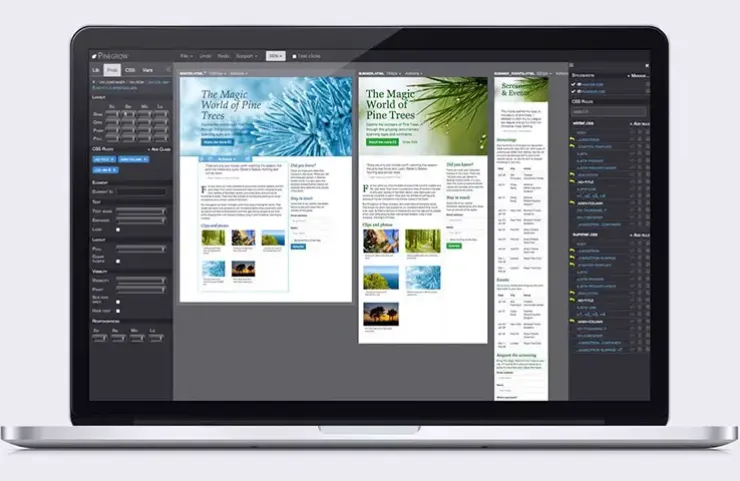
Pinegrow Web Designer is a desktop app for Mac, Windows and Linux, that lets you design webpages fast. It builds pages using CSS & Less and supports frameworks including Twitter Bootstrap and Foundation.
The simple drag-n-drop interface allows you to rapidly build your pages, and numerous contextual properties enable fine-tuning. Pinegrow works with standard HTML files. You can open up existing web projects and edit them right away, there’s no proprietary tie-in.
What’s more, Pinegrow Web Designer allows you to build your own component library. Have an element that you use all the time, like a copyright notice, or a link to a particular site? Simply add it as a custom component and drag and drop it whenever you like. Pinegrow saves components as JavaScript files, so you can easily edit anything you create.
Yet another time saving feature is the undo. How many times have you made a mistake in a CSS file and wished you had more than 1 level of undo? Well Pinegrow gives you 20!
Most importantly, multi-page editing allows simple development of responsive sites. And this is the application’s main boon; nothing else will rapidly build responsive sites quite like this.
The multi-page edit feature and page mirroring means you can style related pages at the same time, creating a sense of consistency so vital to professional design.
Spend a week with Pinegrow Web Designer and you’ll never design a site in Photoshop again!
This incredible application normally retails for $49.95—which is a bargain—but thanks to MightyDeals you can now get it for just $24, that’s a huge 52% discount. Head over to MightyDeals.com to grab this offer today.
WDD staff are proud to be able to bring you this daily blog about web design and development. If there's something you think we should be talking about let us know @DesignerDepot.
Best design tools and resources are those that can lay claim to characteristics that typically include ease of use and related workflow characteristics, future-readiness, easy integration with supporting tools or…
Black Friday 2025 is more than just slashed prices—it’s a chance for web designers and agencies to level up workflows with smarter tools and bolder ideas. From wireframes and prototypes…
Designers understand the importance of pushing boundaries while keeping user experience at the forefront. Yet, not every creative idea is easy to implement through a theme alone—or even with solid…
Let’s be honest—there’s no shortage of WordPress themes that look good on the surface. But when it comes to keeping pace with evolving design standards, performance expectations, and user behavior,…
Let’s be real—our lives are so intertwined with the digital world these days. Whether we’re shopping for the latest gadget, managing our bank accounts, or even just catching up with…
Gone are the days when “pretty pictures” alone could ensure visitor engagement. If your site isn’t responsive, practical, and easy to work with, users will quickly bounce. As a result,…